
Kiosk Equipment Guide
IN THIS ARTICLE
Setup Guides/Troubleshooting
Standard Kiosk Equipment Kits
Alternative Kiosk Equipment
Self-service kiosks provide a fast and efficient way for event attendees to purchase tickets. These kiosks allow users to browse event options, select their tickets, and complete transactions using credit cards. By offering a self-guided experience, kiosks reduce the need for staff at ticket counters and help minimize wait times for attendees. This streamlined process is ideal for managing large crowds, improving both customer experience and event operations.
Ready to add self-service kiosks to your SaffireTix equipment strategy? Reach out to your Ticketing Account Manager to get started! If you have already used Kiosks in past events, you can submit a rental request at: http://saffire.com/saffiretixinfo.
Setup Guides/Troubleshooting
|
Kiosk Equipment Setup |
Kiosk Setup in Spark |
|---|---|
| Setting up your SaffireTix Kiosk equipment | Preparing your ticketing account for Kiosks |
|
|
|
| Kiosk Onsite Setup | Kiosk Setup for Spark |
| Printers | Setting up Windows for Kiosks |
| Credit Card Readers |
|
| Kiosk Enclosure Building Guide |
|
| Kiosk Troubleshooting |
|


Standard Kiosk Equipment Kits
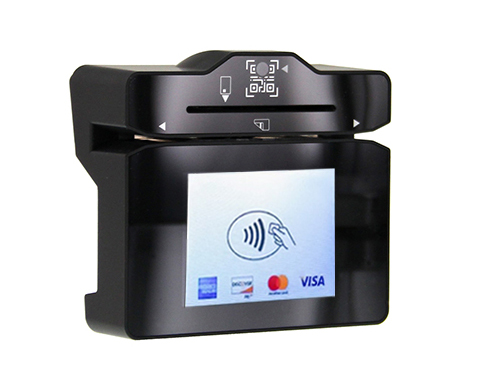
SaffireTix self-service kiosks are shipped to your event as a Kiosk Kit, containing (almost) everything you need. Your credit card reader and ticket stock will be received separately, as they vary based on individual client needs.
|
|
|


Kiosk kits are made up using a computer, touchscreen monitor, ticket printer, and card reader.

|

|

|
|
Alternative Kiosk Equipment
You can also combine rented kiosk equipment with equipment you already own. If you would like to set up a kiosk with your own equipment, reach out to your Ticketing Account Manager to discuss compatibility. Please note that SaffireTix Box Office requires Windows 10/11 and cannot be run on Chromebooks or Mac.
Submit your Rental request at: http://saffire.com/saffiretixinfo