
8.1 Release Notes
As always, we encourage you to read the notes below and try out the new features for yourself. Please reach out via support@saffire.com if you have any questions!
3D Secure (3DS) Controls
Location: Commerce > Fraud Protection
This new feature allows you, as an organization, to choose what is the 'Minimum Order Total for Analysis'. What this means is that you can now control if/when orders will be authenticated for 3DS, either in a frictionless or non-frictionless process. Instead of incurring a cost of $0.20 for EVERY transaction, you can set this new Minimum and only pay for orders that are OVER this dollar value.
NOTE: Any orders under this dollar value will not be authenticated with 3DS, and will therefore not have any liability shift to the issuing banking institution in the case of Chargebacks/Disputes for true fraud.

In the example above:
- 3D Secure is enabled
- Non-frictionless Authentication is selected to provide the most comprehensive security for liability shift
- Authentication only occurs if an order total is greater than or equal to $50.00
- This means all transactions below this $ value will NOT be sent for authentication.
- Transactions below this $ value will NOT incur a cost to you.
- There is NO LIABILITY SHIFT on any disputes/chargebacks on orders below this $ value.
- Authentication is required (either frictionless or non-frictionless) for all orders above $200.00.
Event Importer Improvements
Spark Location: Events
The updated event import tool now handles multiple instances of Full Page Events with unique dates, times, and locations. It's managed by adding the Event Name & Year on one worksheet tab and the individual instances (items) on a second worksheet tab. Each instance of the event will still appear in your calendar, yet every one will link to the same event page. And if you import an event name which already exists in the system, the importer will only add any new instances (items) to the existing page, ensuring no duplicate event pages are created.
Another big improvement: If you prefer to use Quick Events in your calendar, you can now add duplicates using the same event names and year. So 'Jo Jo the Juggler' can be added repeatedly for each performance.
You'll need to download the latest version of the Event import template. And we recommend chatting with your Saffire Website Account Manager to go over additional specifics regarding the importer.
Change Log Enhancements (Fraud Protections)
With this improvement you will now be able to see more detailed updates that were made in the change log regarding Fraud Protections. You will now be able to see what the values have been changed from previous values to the new values.
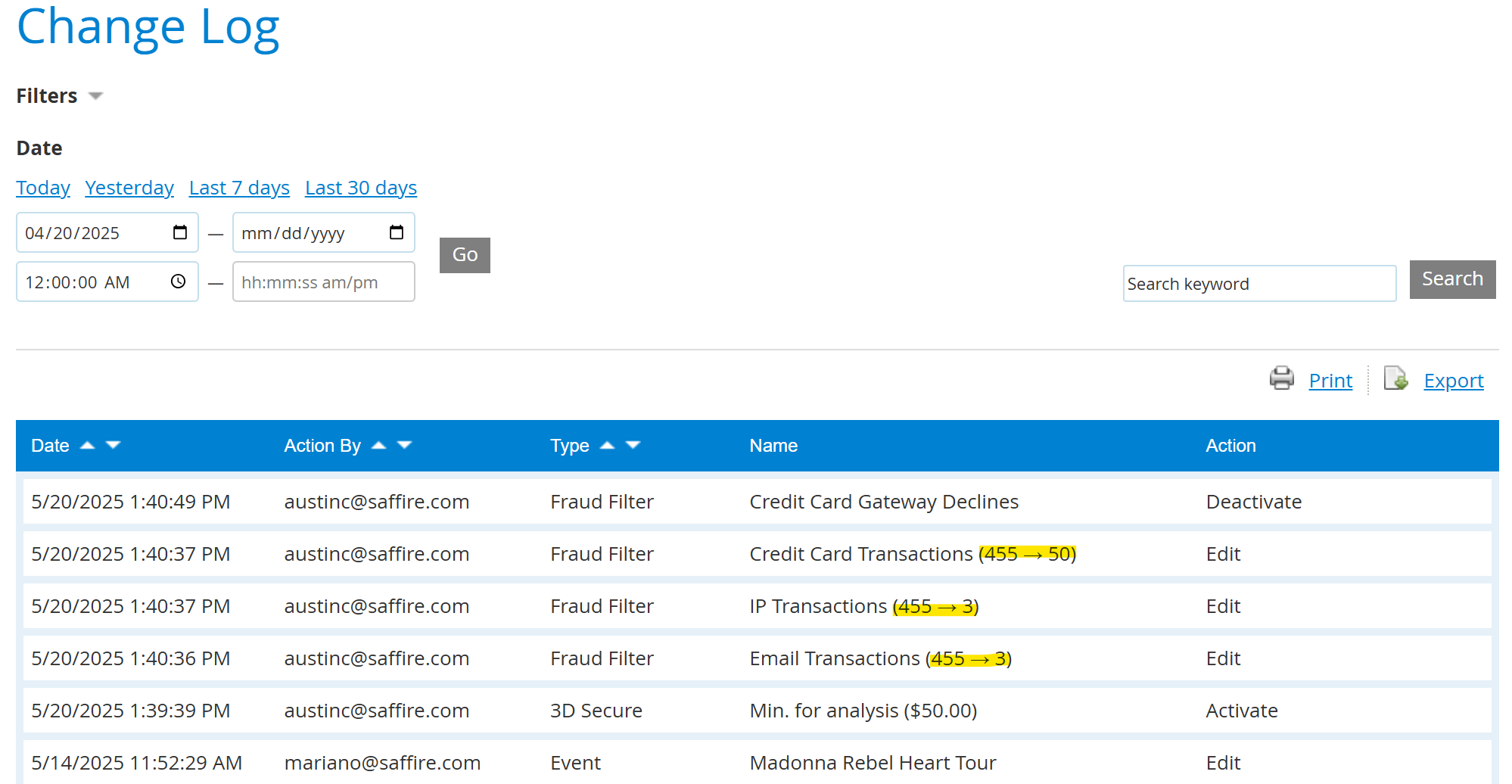
In the example above:
- Changes made for the entry at 1:40 PM were done by User austinc@saffire
- Velocity filters for Email were changed from 455 to 3
- IP transactions were changed from 455 to 3
- Credit card transactions were changed from 455 to 50
Other Improvements
- Kiosk - Find My Order
- We have improved the Find My Order screen on SaffireTix Kiosks so that you don't have to dedicate a full kiosk to Order Lookup, but instead added a BACK button to the purchase screen so that customers can use a single Kiosk for sales and Order Lookup
- AVS Support added for Magensa
- When using the Magensa Payment Gateway online, you can now validate AVS controls in addition to all the other Fraud Protection tools
- This Product has Sales Tax confirmation
- In the product editor, we have moved the checkbox out of Advanced Options on the Sales tab and provided context for the Sales Tax percentage (%) being applied if the checkbox is selected.