
DMARC details & necessary changes
Here’s the scoop…
Google and Yahoo are tightening requirements for 'Bulk Email Senders', which will have a big impact on any sites selling tickets and/or sending mass emails. This includes using your domain as the sending address with a service such as Hive, MailChimp, Constant Contact, etc.
The goal is simply to make sure your emails are landing where they should, which isn’t new territory for Saffire. We’ve always prioritized client-to-customer communication and security, this just extends the existing authentication mechanisms SPF and DKIM by utilizing a protocol called DMARC. Phew… sorry about the geek-speak!
To determine how to proceed, see if either of the following pertain to your site:
-
You’re certain that Saffire manages the DNS for your site.
If you’re unsure, just contact Support@Saffire.com
- OR… You know that your site URL is using a Saffire subdomain – such as ‘yoursite.saffire.com’
If either of those are true, you can rest easy and carry on. We’ve already taken care of things for you.
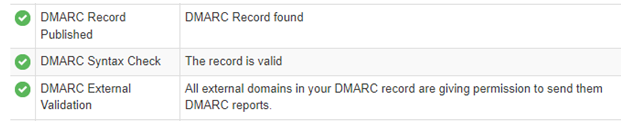
Now… it is possible that you might already have DMARC in place on your site. You can check that yourself by going to https://mxtoolbox.com/dmarc.aspx. Enter your domain name and click the ‘DMARC Lookup’ button.
If there IS a record, it will be clear:
If there’s no record, that will also be evident:

If you don’t have a DMARC record in your DNS, here are your options:
- The simplest way to fix that is by sending your DNS login credentials to Support@Saffire.com and we’ll take care of it.
- If you have someone who manages the DNS (your local IT person), you can ask them to add the following record:
| Record Type | Name/Host/Subdomain | Value/Record | TTL |
| TXT | _dmarc | v=DMARC1;p=none; | Any number |
For those in the know, we need at least a non-enforcing DMARC record.
If you want to take an even deeper dive into these changes, check out these links:
As always, we’re here for you. Whether you need guidance for these updates or prefer us to handle the DNS changes, just drop us a line at support@saffire.com. We're here and ready to help!